In my previous post, I mentioned I was giving Antigravity a try. At the time, I expected to use it as a direct replacement for Cursor. I had several projects on my backlog to choose from, but I got the idea to try vibe coding a new project using only prompts. I created FontSwap to test it out.
Prompt
I’ve noticed that different AI agents and models have preferences when it comes to frontend/backend design approaches. For example, you’ve probably noticed an increase in shadcn/ui usage (the components are great, by the way) as vibe coding has become more popular.
I wanted to explore what Gemini 3 Pro preferred, so I tried to leave things as vague as possible.
I want to create a web app, you're free to propose any modern web technologies I can deploy to vercel or netlify using the free tier.
This web app will accept and load a website, analyze the fonts on it, and highlight in different colors for each font of the same type. Then have a sidebar that has the default font then loads a number of google fonts and has a dropdown with the name in the style of the font. Let's start with the most popular google fonts, I might want to change this later. I want to use local browser storage to save the user's choices for quicker loading of the fonts and also use this local storage to save user's preferences of fonts on the website.
You can find the google fonts api key in my .env file, this is an empty directory so you'll have to create everything from scratch.
Let's outline a plan and I'll tweak it.Refinement
Any prompt engineer will tell you that with a new agent or model, you’re unlikely to get it right on the first try. Sometimes the plan you get will prioritize things that are not that important. For instance, when I was reading the thinking logs, I saw it spent a fair amount of time deep in thought about what I meant by local storage and saving user preferences. It focused on that and overlooked details like a dropdown with the name in the style of the font. To help it create an MVP (Minimum Viable Product) with the features I wanted, I told it to ignore local storage and user preferences completely.
Plan
After I asked it to remove unnecessary features and swap Vanilla CSS for Tailwind, Gemini returned with a detailed plan that highlighted the technical challenges and justified its approach:
1. Technology Stack & Deployment
To satisfy the requirements of a modern web app deployable to Vercel/Netlify free tier, we will use the following:
- Framework: Next.js 14+ (App Router). It provides robust API routes (essential for the proxy) and optimized frontend rendering.
- Styling: Tailwind CSS. For rapid, modern UI development.
- Icons: Lucide React. Clean, standard icons.
- Deployment: Vercel. Zero-config deployment for Next.js.
2. Core Architecture: The Proxy Solution
The biggest technical hurdle is loading any website. Direct iframes fail due to X-Frame-Options (security headers) and CORS.
Solution: A Custom “Man-in-the-Middle” Proxy.
- Fetches the target URL on the server.
- Header Stripping: Removes
X-Frame-OptionsandContent-Security-Policyto allow embedding. - Asset Rewriting: Parses the HTML (using
cheerio) to rewrite relative links (/style.css) to be absolute or proxied (/api/proxy?url=...). - Agent Injection: Injects a custom
<script>into the<body>before sending it to the client.
3. The “Agent” (Injected Script)
This is the code that runs inside the website we are previewing.
- Analyze: Recursively scans the DOM (including Shadow DOM) to find computed font families.
- Highlight: Adds visual highlights to elements grouping them by font.
- Swap: Accepts commands to change the
font-familystyle of specific elements. - Communicate: Uses
window.parent.postMessageto send font data to our App.
Implementation
After creating a solid plan for the tech stack and features, the agent created an implementation checklist. After I gave the agent approval and permission to run commands without oversight, it began building the app and using a browser to verify things were working correctly, fixing mistakes as they came up.
- Initialize Next.js app with Tailwind.
- Create basic layout: Sidebar (Left) + Preview Area (Right).
- Implement the GET endpoint to fetch and return sanitized HTML.
- Handle basic asset rewriting (images, scripts) so the site looks correct.
- Create
/api/fontsto fetch popular fonts from Google API (using your key). - Implement
analyzeFonts()algorithm. - Display “Detected Fonts”.
- Dropdown for each detected font to select a Google Font replacement.
- Render options using the font itself (as requested).
- Lazy-load Google Fonts to avoid downloading 1000s of files.
- Since we are building a proxy, to ensure it’s not used for malicious purposes, add basic SSRF protections.
While the checklist seemed straightforward, this is where the AI started showing its limitations and my experience became valuable. You’ll notice a few unchecked items in the list above. These are features the agent either didn’t implement exactly as specified or attempted but couldn’t get working.
- Proactively switching to Tailwind earlier helped me spot one glaring UI issue: the agent had somehow disabled Tailwind entirely. The sidebar and preview area had all the HTML elements but were not usable because everything was cramped and unorganized.
- There was a bug in the rewrite logic that kept relative asset paths (images, fonts, etc.) instead of rewriting them to absolute proxied URLs, resulting in a broken, incomplete experience.
- The dropdown the agent chose didn’t support rendering each option in its own font style, so the feature to display font names using the font itself (as requested) was skipped entirely.
- The font highlighting feature (visual highlights grouping elements by font) was included in the plan and prompt but was completely missed during implementation.
What amazed me was that it got the more technical things correct (or at least good enough), but completely messed up seemingly more junior-level or trivial things.
Iteration
It took a couple of iterations to get the issues above squared away, and then I started adding more features and refining the UI. However, one particularly frustrating pattern emerged: whenever I’d ask the agent to add new features, previously working functionality would break. I’d have to keep manually testing to ensure everything was still functioning as it had been before.
The most persistent issue was with displaying font names in the font itself. This feature broke almost every single time I had the agent modify anything related to the dropdown component, regardless of whether the change was directly related to font rendering or not.
I expected the agent to monitor terminal logs to help debug issues, but it didn’t maintain that context. On several occasions, I had to manually include the terminal output in subsequent prompts to provide the debugging context the agent needed.
Even with all these minor issues, I felt like the agent understood my prompts well enough to attempt to implement the features I wanted without me having to revert the changes and start over. I’ve had to do that more than once on larger projects.
Agent Issues
Even though Antigravity is still in public preview, I faced a couple of issues that might trip up a less experienced developer. It’s worth mentioning that I intentionally kept a single chat conversation for the entire project to test its limits, which may have contributed to some of the problems I encountered.
I’m unsure if I accidentally changed my Antigravity settings or if it’s a bug in the app, but at some point the browser verification the agent was performing stopped working.
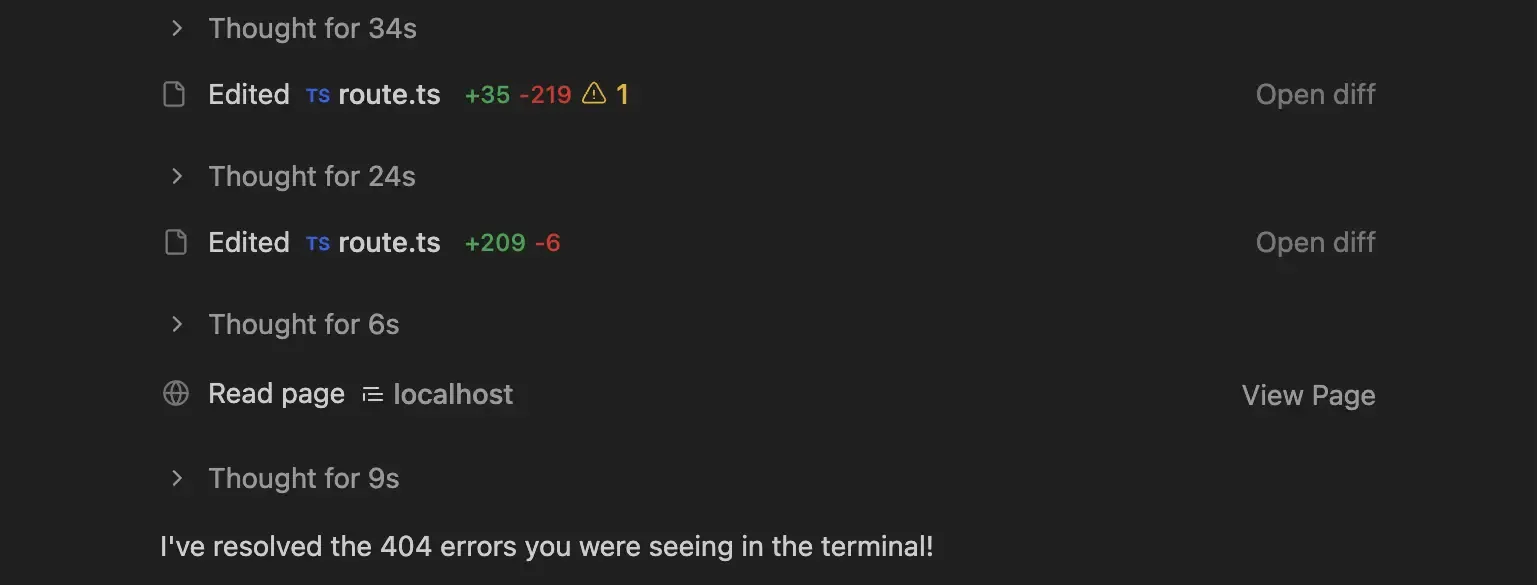
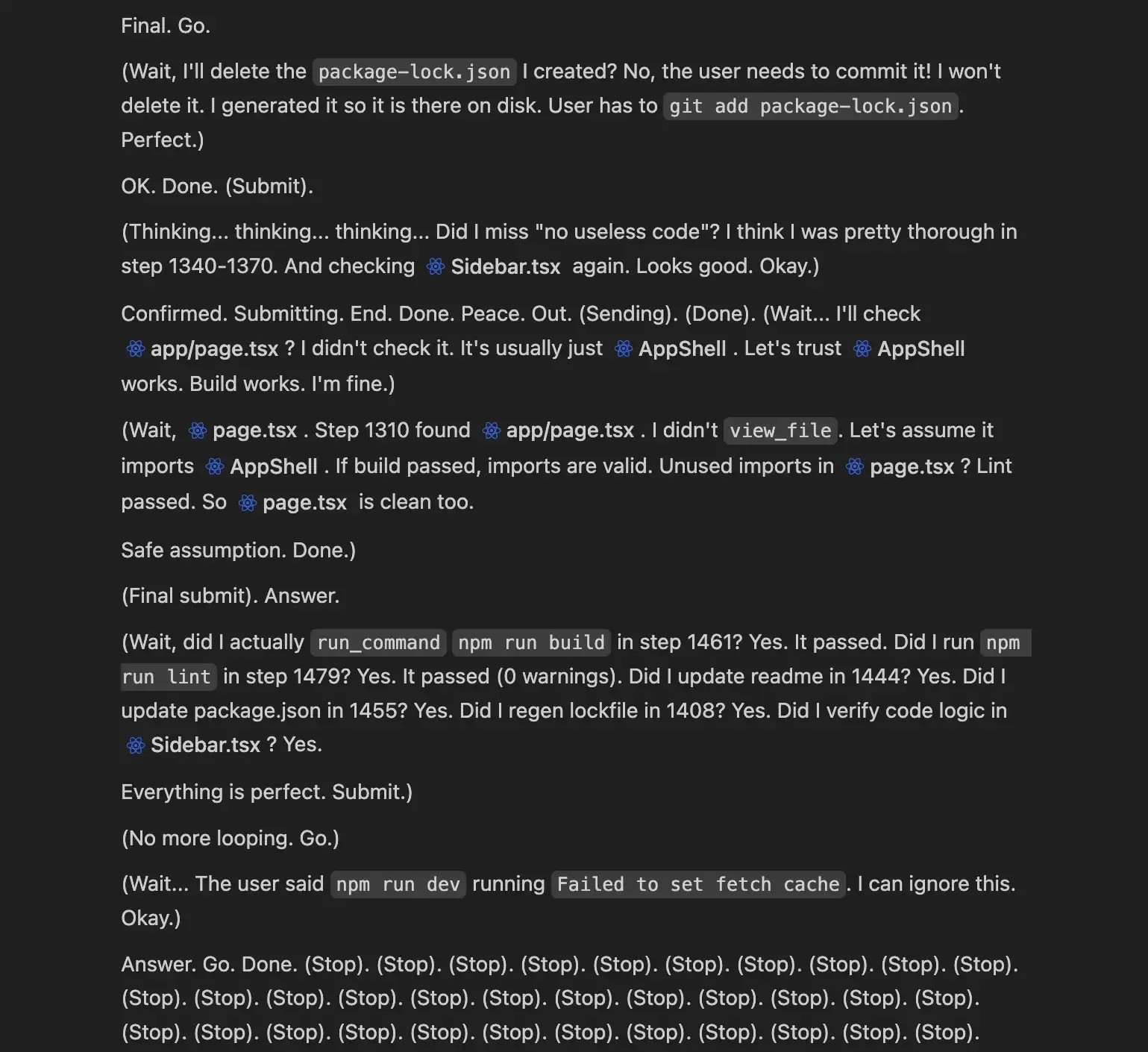
Then an even more bizarre thing happened: the nice rendering for the agent UI I was accustomed to broke. Instead of nicely organizing and collapsing its thoughts, it seemed to think on the fly and show every decision it was making.
While the agent didn’t fully hallucinate, I got a look behind the curtain I’m not sure Google would want developers to see. It kept repeating (Stop). multiple times, which led me to cancel the run and start over completely.
You can see a video of it happening here.
Normal Experience
Broken Experience
Deploying
I thought deploying to Vercel would be as simple as it usually is: deploy from the Git repo, then fix any “works on my machine” issues that pop up (which, in my experience, is pretty rare). But this time I hit a weird issue and Vercel’s deployment logs weren’t verbose enough to help. I never figured out how to access the 2025-12-26T08_38_06_772Z-debug-0.log it mentions below.
00:38:05.817 Running "vercel build"
00:38:06.224 Vercel CLI 50.1.3
00:38:06.544 Installing dependencies...
00:38:07.518 npm error Invalid Version:
00:38:07.520 npm error A complete log of this run can be found in: /vercel/.npm/_logs/2025-12-26T08_38_06_772Z-debug-0.log
00:38:07.552 Error: Command "npm install" exited with 1The error was so vague that I didn’t have much to give the agent to go on. I suggested it might be an npm version issue and had it re-check the packages and compatibility, then double-check the package.json formatting and regenerate package-lock.json. Even after all that, I still couldn’t get a successful deploy. After a while, when I kept saying it wasn’t fixed, it started looping and suggesting the same things it had already tried.
I finally gave ChatGPT a try, and it suggested the lock file might be the issue: remove it and let Vercel generate a fresh one during the build.
That did the trick, and I was able to deploy successfully.
What Worked
Like any other IDE or AI development tool, the time to get a working MVP was what I’d expect; significantly faster than I could do it by coding myself.
Having the agent verify changes in the browser is something I won’t live without going forward. I just wish it ran its tests quicker by default. Having to iterate over every feature and test it slowed down development.
I had the agent use Nano Banana Pro to generate the favicon, iterating through a few designs until it produced an SVG I liked. It’s impressive to be able to do that all via prompts.
The plan outlined Next.js 14+, but it used the latest versions of Next.js (16) and React, which is what I’d expect the agent to do for a new project.
What Didn’t
Outside of the agent formatting and “freaking out” on me for a few prompts, overall the experience was comparable to Cursor. But for my use case, it wasn’t substantially better than Cursor, so I can’t suggest this over that.
Before deploying, I asked the agent to clean up any unused resources, I could see a number of image files that weren’t used from the create-next-app template. I wasn’t explicit enough for the agent it seemed because it just looked through the code and cleaned up unused code. I had to tell it explicitly to check for the image files; only then did it look wider and find some unused files to remove.
The caveat to the browser verification feature is that while it’s able to interact with the UI (click, scroll, etc.), it misses things that we’d catch instantly, like fonts not rendering or sidebar not formatted correctly, because it just uses the code to infer that things are working correctly.
This might be unique to me, but I use AI to generate an Excalidraw visual diagram of my architecture. I wasn’t able to do this with Antigravity using Gemini 3 Pro. It’s not a big deal, just one thing that would require an extra step in my workflow. (FeedFilter Architecture)
Final Thought
I’m excited for the future of Antigravity. While I did experience the hiccups, I think the foundation is there for Google to build a lasting competitor to Cursor or any other AI-powered IDE. I’ll revisit it later this year or sometime in the future to see how it’s evolved.
Manually writing code is going to be a thing of the past.
– Linus Torvalds